Are you worried about what and how to teach mathematics to your child? Are you worried that your child will not understand mathematical concepts? Do you have a learner struggling with arithmetic? Did you have a bad experience when learning math using traditional ways and lack the confidence to teach mathematics? If so, then please take the time to read this review carefully and consider Professor B Math as an option.
Alyssa and I were selected to review the Professor B Mathematics E-Learning program. It was developed by Everard Barrett and published by Professor B Enterprises. The E-Learning program was developed after the success of his Mathematics Power Learning for Children Curriculum. This program is suitable for children in grades pre-k through eighth grade. The product we reviewed was a yearly e-learning or online subscription with access to ALL THREE levels including the associated linked workbooks and answer keys for each level. We were given individual passwords to access the material and program.
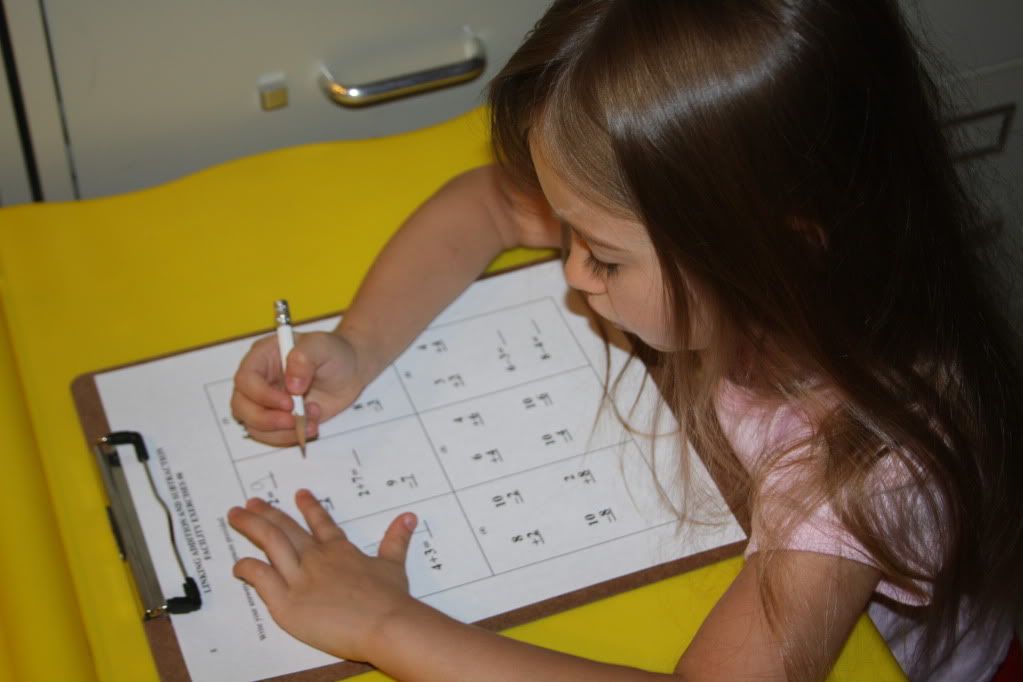
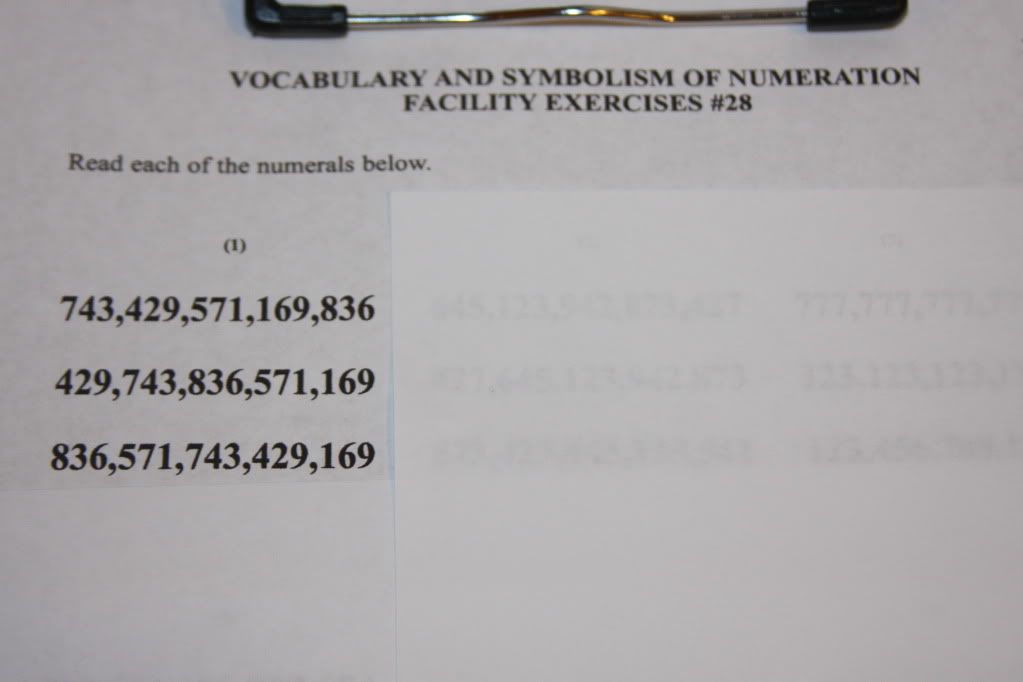
The printable workbooks are in black-and-white PDF format and easy to download using Adobe. The workbooks are available for additional practice activities or exercises to help children achieve mastery and to check on readiness for the next level. Each workbook has over 100 + pages of exercises corresponding to each level. The basic workbook directions provided minimal information. It is assumed that you know how to do each page based on the e-learning experience. When it is time to practice using the workbook pages, the program tells you what pages to focus on and for how long. There are no other distractions or clutter found on the pages. The pages may seem overwhelming or busy for younger children. You can cover problems not currently working on or use a homemade window viewer to limit the number of problems a child focuses on in each sitting. You can see an example of a workbook page in the photo below.
 |
| Here she is completing a fact family workbook page. |
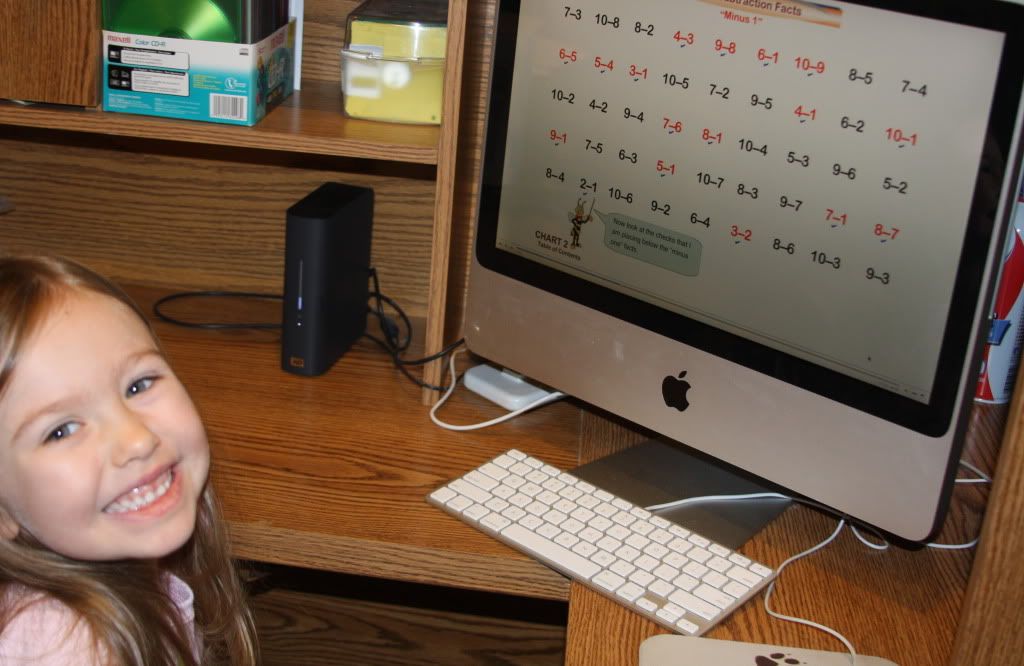
The e-learning lessons are presented in slide format and the teacher and/or parent reads the verbal explanations aloud. This is a total mastery-based program based on telling children "the truth" about math from the very beginning. You may be asked to repeat lessons in order to practice the concepts for a certain number of days until mastery is obtained.
It is an "out of the box" conceptual or contextual teaching program that focuses on teaching the meanings of math concepts rather than just rote memorization drills. It is not structured like the many animated math games or curriculums found on the internet today. You may need paper and a pencil to complete several lessons so keep these items near the computer.
 |
| Here she is learning about minus 1 subtraction facts. |
Professor B Math E-Learning is a unique program that teaches mathematical concepts - this is not your traditional math curriculum. The e-learning program uses mental structures connecting many pieces in order to tell a mathematical story so to speak. The learning process occurs naturally and children assimilate the materials quicker this way. Professor B Math came to us at the opportune time. Alyssa had just completed her entire math curriculum and we were eager to try a new math program over the summer months. My curiosity was sparked. I was intrigued by what the program had to offer.
Not to mention, I was truly fascinated by the achievement data and mathematical testing accomplishments of Professor Barrett and his methodologies. His methodologies have been around for over 30 years. Through implementation of this curriculum, first and second graders in schools mastered all addition, subtraction, and multiplication facts while second graders mastered long division. Children were working at least one grade level above schedule. His program also enabled fifth and sixth graders to out perform the brightest ninth graders on a state test. Click here and scroll down to read about it. Don't forget to read the achievement data to learn how this math program increased children's mathematical understanding at a deeper level.
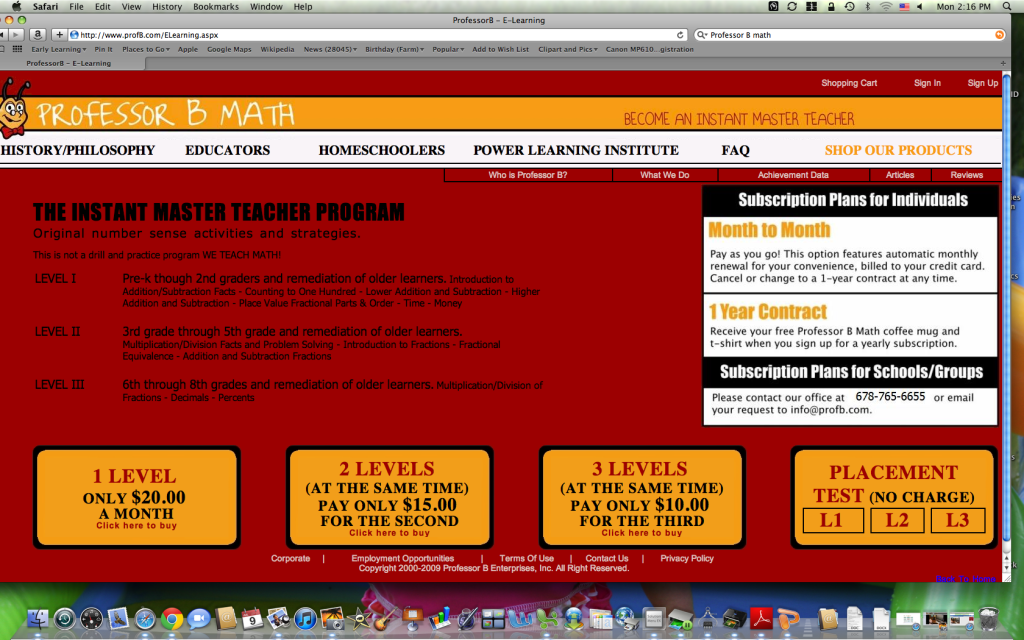
The E-Learning program is broken down into three levels and all levels can also be used for remediation:
- Level 1 is recommended for children in pre-k through 2nd grade. This is the level that we are currently using during math lessons. Children as early as age three have started this program. This level covers concepts including number sense, counting to 100, compliments of ten, addition and subtraction, reading large 15-digit numbers, adding and subtracting large numbers, place value, fractional parts, column addition, time, and money. See the Level 1 screen shots of the Table of Contents in the next section below to read the scope and sequence.
- Level 2 is suitable for 3rd through 5th graders. This level works through multiplication, division, problem solving, fractions, equivalent fractions, and adding and subtracting fractions. See the Level 2 screen shots of the Table of Contents in the next section to read the scope and sequence.
- Level 3 is for students in 6th-8th grade. Level 3 covers topic lessons including multiplication and division of fractions, decimals, and percents. See the Level 3 screen shots of the Table of Contents in the next section to read the scope and sequence.
The company claims to cover three years of math per level and each level takes approximately 10 months or more to complete. It may take younger children more time to complete the program.
Mathematical Concepts Covered in Each Level
I wasn't sure if the concepts covered in their textbooks and mentioned in their scope and sequences were the same for the e-learning program so I took a few screen shots to show what is covered. You can also see the link to the workbooks for each level.
The screen shots below show the Table of Contents and the concepts covered in the first level.
Here are the screen shots of the Table of Contents for Level 2 displaying the concepts covered.
Here are the screen shots of the Table of Contents for Level 3 to give you a better understanding of what is covered.
Click here to see
samples of the e-learning program on their website. Lesson videos can also be viewed on
You Tube.
Cost
You can choose to pay for your subscription on a month-to-month basis or you can pay an annual price. The current cost of the e-learning program, as indicated on their website, is $20 per month for each separate level. The company offers discounts for the purchase of multiple levels to be used at the same time. Any two levels purchased would be only $35 per month. If you would like to have access to all three levels at the same time then the cost would be $45 per month. The yearly cost for level one WAS $220. The company has informed us that the price for a yearly subscription has dropped dramatically! The yearly price per level is only $100 for a 36 month access. That means ... each Professor B Math E-Learning level will cost $100 for a total of three years access. That's pretty reasonable considering how long you have access to that purchased level. The dropped prices will definitely help families with additional or multiple children working at the same level - when one child finishes but you do not want to rush the younger child. It gives them more time to complete the lessons at their pace based on their abilities. Please call the company (contact information at bottom of review) to place an order. They will honor the new prices until their website reflects the updated pricing information. When you sign-up for a yearly subscription, you will receive a free coffee mug and T-shirt. I would also suggest that you call and request the 30 day free trial before deciding to invest in this program to see if it works for your situation and your child's learning style. The best deal if you have multiple children at different levels would be to access all three levels. Keep in mind that only one child can be logged in and working at the computer at a time. You must also decide how to schedule 1:1 lesson time with each child since the parent is required to actually teach the program.

How We Used It
This program temporarily replaced our core math curriculum for the summer. In the beginning, when we were figuring out a schedule, we worked on lessons late at night and our lesson times were very spontaneous. We ended up consistently using it 3-5 times per week for a minimum of 10-45 minutes a day depending on our daily schedule and lesson difficulty. One day she spent an hour and fifteen minutes working through the lessons at the library during two house showings. I used this program as a way to advance her studies in math over the summer. I printed the practice workbook pages and we did several activities verbally while in the car, shopping, or at appointments. I also used the workbook pages on days when we were unable to work online.
W
e started at Level 1 due to Alyssa's age (4 1/2) and abilities. After viewing the free Level One Placement Test, I immediately knew that Level 1 was the place for her to start. There are no placement test instructions on how to determine your child's level or where to begin. I am not sure if this placement test would accurately place a child within a level. It doesn't necessarily guide or tell you where within a level that your child should begin working. It is assumed that you will start at the very beginning of each level once you have made the decision as to which level to begin. I wanted her to start from the very beginning to assure that there would be no gaps in learning with Professor Barrett's teaching methods.
The beginning lessons were easy for her but they presented math facts in a unique and unfamiliar manner that I wanted her to be exposed to before advancing through the lessons and levels. We did not move on to the next lesson until I felt she reached facility level learning ... meaning she could do the lessons accurately, quickly, at ease, and without hesitation. We came upon several lessons that required Alyssa to write statements using number words. This can be seen under "Applying Place Value" lessons. I allowed her to copy the number word statement from the screen since she was too young to know how to spell the number words accurately.
Our goal this year will be to work through Level 1 lessons aiming for mastery-level learning before our subscription ends.
Level One Experiences
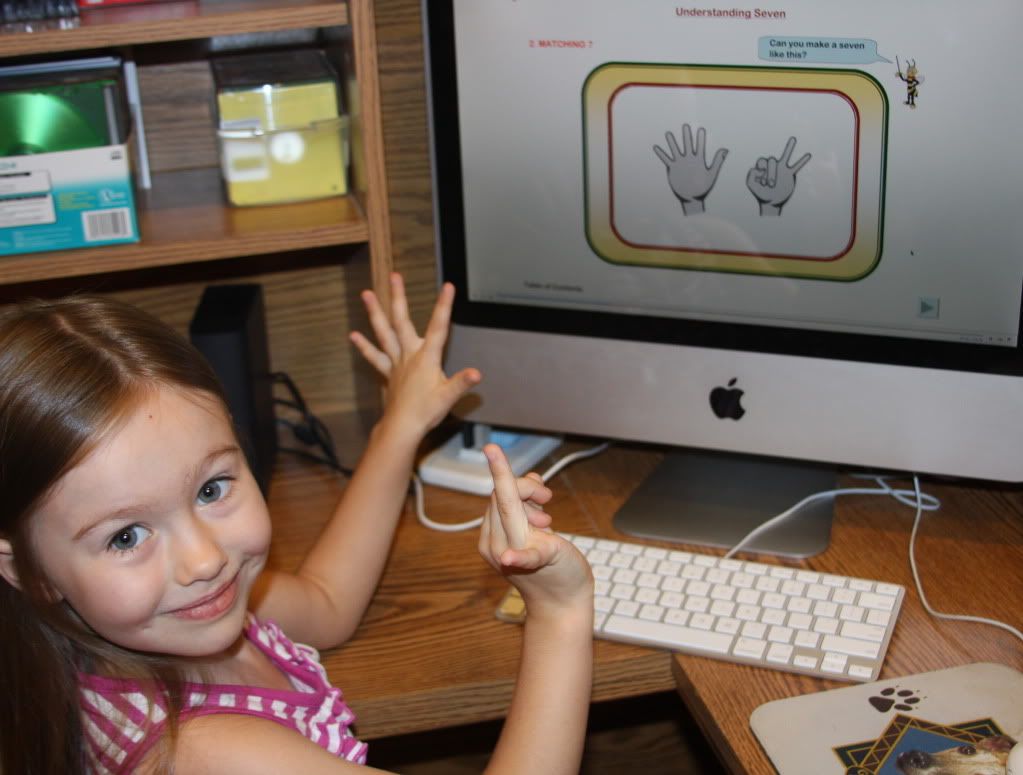
Alyssa enjoyed the math lessons and is starting to competently and accurately understand her addition math facts. The first couple lessons were extremely easy for her and reviewed basic number sense concepts. She really liked trying to figure out how to manipulate her fingers so that they would match the screen.
Alyssa also enjoyed the more or less activities and the compliments of ten exercises. I opened her bedroom door one morning only to find her awake practicing compliments of ten and then she asked me to do a couple more than less than problems. I found out that she was practicing because I asked her what she was doing before I opened the door. I am glad that she is learning the concepts and practicing in her free time. I will say that even though she enjoys this program she definitely prefers her core math curriculums and online program over Professor B Math. She asked me on several occasions when we will start using the other curriculums again. She really misses them!
I was extremely surprised and impressed with her when she was able to read a fifteen digit numeral accurately and understood trillions and billions for the
first time ever. I realized at that point ... I was holding her back a bit due to her age. Remember she is only 4 1/2, so you can see why this was such a surprising wake up call for me. She was capable of doing much more than I thought. You can read more about our experiences throughout this review.
I taught second grade and I was surprised to see the pace of instruction at which advanced concepts were presented while using this program. There were many skills presented in Level 1 that were not taught or covered in the classroom for that particular grade level at our school. One example would be the reading of a fifteen digit numeral. This concept would have been introduced at a much later time at school. Look at the screen shots below to see this lesson presented in a logical, sequential progression or order. This lesson truly amazed me and caught my attention!


As I discuss the pros and cons of this program, please remember that everyone will have different opinions and I believe that the reviews will be mixed for this product. What might be a pro or con for us may not be the case for your family. Consider the needs, abilities, and learning styles of your children before deciding whether this program will be the one for your family. Please remember that your child may have a different learning style from you or the way you teach.
Pros
- Alyssa thought the bee was adorable in his cute, little glasses. I used a different voice when speaking as the bee. I also changed the voices to make it even more fun. One day I spoke as if I were Elvis and another day I acted as if I were someone with an Australian accent.
- No experience is necessary to teach this program to children. They say, "If you know how to read then you will be able to teach using this program." If this is the case, the parent can ask another relative to work on math with a child while the other parent is working with a child 1:1. This is a great way to involve other relatives or friends into the homeschool day. The curriculum is scripted for adults to read aloud which makes it relatively easy for all. It may seem awkward reading the scripted lessons aloud as children get much older. I am concerned that children working at middle school grade levels may not participate if the parent is REQUIRED to read all lessons aloud. I would consider letting them work through the program while the parent is working nearby and can still assess their knowledge.
- There is absolutely no prep time if using this program and it was extremely easy to implement. Alyssa and I simply turned on the computer, logged in using our password, and started learning.
- Few materials are required to use this program. The only materials required so far have been paper and pencil. At times we replaced the paper and pencil with a mini dry erase board and markers. However, the program does mention chart activities that we did not have access to for lessons. For example, in the lesson "Counting to 100" the bee asked us to point at and handout the chart similar to the one on the screen. We just pointed to the screen, but it was confusing at first. I stopped the lesson and searched for the charts ... only to find that they are available as a separate purchase. I wouldn't say that they are needed unless in a classroom or large group setting.
- Explicit, repetitive "truth telling" verbal explanations are used to teach mathematical concepts. Repetition is a good thing when learning. Children learn best when they hear things more than once. Children learn better when skills are repeated and this will lead towards mastery-learning at a faster rate. I can't tell you how many times Alyssa would say, "Mommy we already did this."
- The program is not based on rote memorization methods. Emphasis is on the mental structures or strategies toward analytical mathematical thinking. The professor teaches mental strategies or structures that challenge your child to go beyond what they might normally do. This program utilizes higher-order thinking skills and is a great foundation for learning arithmetic. I was impressed with the number of advanced concepts or topics presented to the child.
- It encourages natural learning to take place at a higher level therefore children will learn the material for each level naturally with this program.
- The program is sequential and teaches concepts in a logical manner step-by-step. I showed this program to several friends and they were amazed at how the program was broken in such minute steps to help the children understand and be exposed to the concept thoroughly. They also said it was indescribable ... in a good way.
- At first, Alyssa really enjoyed the flash math activities. She challenged herself to beat the bee and to increase the speed at which she responded. This reminded me of other games we played in the classroom when flashing domino dots or ten frames to the students. See note below under the con list (number 14).
- Mastery-Based - This teaching program aims at the child reaching mastery-level learning for each concept taught. The student must attain facility of the concept before moving on. The child should not move to the next lesson unless mastery has been attained. I think it is important that children understand the concept completely before moving on and getting frustrating with concepts that tend to build on each other.
- The lessons are for the most part short or brief which makes it easier to cover in several segments or to do several short lessons throughout the day depending on lesson duration - as long as mastery was attained. We also made use of the pause button for breaks. In that time, Alyssa would get a drink and do a few exercises to get her blood flowing and reenergize.
- The program contains built-in review practice activities that were mentioned at the end of many lessons. The practice lessons were to be mastered before moving on to the next lesson. The parent receives a reminder message after the completion of a lesson - reminding parents to practice skills with their children a certain number of times and for a certain number of days.
- This program does not utilize many expensive math manipulatives. Fingers were used as natural manipulatives. For example, a child that holds down 1 finger will see that 9 fingers remain up revealing that 9+1=10.
- Professor B Math products have been around for over thirty years in the math education community. It has a long standing history with notable accomplishments or results and impressive achievement data based on testimonial reviews and statistical data analysis.
- The program is individualized or differentiated allowing each child to become proficient in math and gain a deeper understanding of math concepts at their own pace of learning which is based upon their abilities, needs, and mastery-level. They can complete the program as fast or as slow as needed.
Possible Cons
- The website clearly states that there is intentionally no sound during the lessons. The teacher is to represent the bee and to read the verbal explanations the bee presents to the student. It just felt like there needed to be something ... some kind of sound effect. Sound effects can be added to arrows moving to the next lesson. This was not a disadvantage for us and may not be a disadvantage for children easily distracted by sound effects. In today's society we are used to animation and sound effects. I think that's part of the reason why I felt like something was missing from the program.
- Use of fingers as manipulatives may be problematic. There are some math curriculums and teachers that recommend that children do not use their fingers as a crutch for any type of calculation especially with regards to addition because it slows the learner down. They discourage children from using their fingers to solve problems and see it as a lack of accuracy. I also did not see this as a disadvantage and I felt it was a neat way to teach arithmetic. Children can use their fingers as natural manipulatives and will hopefully or eventually use them less as their confidence grows. I wish I had been taught similar tricks for solving equations when in elementary school. The program lessens the dependence on fingers by teaching concepts both with and without fingers.
- Obviously this is an e-learning or computerized program so you may need to limit screen time especially for younger children and if you have access to several other computer programs or curriculums to be used in one day. You could also break up the amount of math you would like to accomplish into several segments throughout the day such as two or three 10 minute lessons. This allows the child to work on other areas of the brain and return to their previous work load. The company does offer different product types including textbooks and workbooks that may meet your homeschooling needs if your children are not computer-based learners.
- There is no tracking for progress or a way to see where the student left off. The parent must write it down or mark it in some way. I can see this being harder for larger families using the program with multiple children. I have a Mac computer and by using the following suggestions from several crew members, I was able to take and print a screen shot to use for tracking progress. On a Mac computer, press Control + Shift + 3 to take a screen shot of the Table Of Contents. Then, import it to your iPhoto library and print for your records. It does use a lot of ink since the Table of Contents is in color. If a lesson was completed to mastery-level, then I marked it with an X through the circle shape. If the lesson needed to be repeated, then I marked it with an "R" in pencil. Thank you Tess and Cristi for the information about taking screen shots and suggestions for tracking progress. Remembering where a child left off posed as another problem. Crew members used post-it notes, wrote it in their planners, or wrote where they left off on an index card as a reminder. It would be more helpful if the company created a printable form for membership subscribers.
- With regards to testing, there is only an optional basic placement test for each level. There are no other testing or evaluation materials available to the users at this time. I think a pretest and posttest would be very beneficial to users of this program. I love seeing what my daughter has learned after using a particular program for a specific amount of time.
- The current cost of this product may be too high for many families. However, the product benefits are definitely worth considering the affordability for several years of math coverage for multiple children. I recommend signing up for the 30 day free trial before deciding if this program meets your needs and your child's learning style.
- I would not necessarily consider this to be a complete nor comprehensive math program since it does not cover time, money, graphing data, measurement, and geometry concepts thoroughly. There are a few bonus lessons for time and money. I would have a difficult time replacing my entire math curriculum for this program without supplementation. I did replace our curriculum this summer with Professor B for the sake of the review. I feel that supplementation would be necessary to cover these concepts effectively. However, I do view this as a complete arithmetic program for learning facts.
- Teacher or parent involvement is intensive and required at all times - especially for non-readers. This program is not meant to be done independently. Even though the program is meant to be teacher-led, my daughter could read the text and kept telling me "I can do it." She also wanted to control the mouse. I explained that it was my job to read the bee explanations aloud and know what she struggles with so that I know how to help her best and what we need to practice. I told her I didn't want her to have to worry about controlling the mouse - I wanted her to focus all her attention on the lesson and her response. I really enjoyed participating with my daughter and spending time bonding as she learned her lessons. I was also easily able to assess what she knew and didn't know as she worked through each lesson. I was surprised by the knowledge gained by using the program.
- Mental arithmetic is approached quickly and may limit children still in the manipulative stage having the need for hands-on, concrete manipulatives rather than abstract thinking on paper or in this case on the screen.
- My daughter was frustrated when she received positive feedback for wrong answers or slow responses. The bee would always provide positive feedback including statements such as: "Yes, that's right! Yes, you are right! You did good! or That was very good!" when clearly she was wrong or did not respond quickly. Although the feedback is immediate and positive it may be a bit confusing or frustrating to some children. She said, "I was wrong and he said, I was right." I told her he acknowledged her efforts in trying the lesson.
- This program may be a little dry for some children that are used to fast-moving animations and sound effects. For example, there was a reading program that Alyssa and I used when she was much younger. We had great success with it because we limited her television and computer time. My friend asked my opinion about that particular product. I explained the circumstances and she found out that the product could not be used successfully with her son due to his exposure to the animations and sound effects of television. He was bored and would not participate. Over the years, Alyssa has been exposed to more television and computer games. She did well with Professor B Math and saw it as a new game to play. The lack of sound effects and animations did not seem to bother her while using this program.
- The repetitiveness may be too cumbersome or lead to boredom for some children that already know the concepts presented.
- There were many design errors on the website. I will just note a few of those errors. On many occasions, the text was not typed within the bee's speech bubbles or the words within the speech bubble were jumbled or squeezed together. During one of the fact family lessons she was told to write the fact family for two numbers with a certain number of spaces in between; however the numbers typed on the screen did not match the numbers given. On another occasion, there was not enough space between words read on the screen which makes it difficult for the reader. This can be seen under "Applying Place Value - Lesson 1 Ty Means Tens." In addition to those errors, during the "Place Value" lesson, the bee told us to "Look at where the digit is blinking now." However, the one's place was NOT blinking. These may seem like minor errors to some but in the end, it could reflect poorly upon the company and their impression. The website could be more organized to make it more user-friendly.
- I mentioned above that Alyssa enjoyed the flash or pointing game with the bee early in the program. Over time when concepts became more advanced, the speed level caused her to become somewhat frustrated. Times when frustration reared its dreary head, I didn't worry as much about the speed because honestly it was difficult for me to follow at times. I memorized the order for the most part. Then, I asked her to tell me the place value after the bee finished pointing to all the numbers and she was quite successful. I also drilled her several times to make sure she could do it easily and sped things up a bit. The speed at which the bee points to problems probably needs to be adjusted since as an adult I found it quite challenging to keep up myself. I was at one point a math major so it is not like I was unfamiliar with the mathematical concepts. Quick animations were a problem and caused similar issues particularly when we were learning addition and subtraction or when reading the value and meaning of large numbers. In one lesson, the computerized fingers were moving up and down faster than Alyssa could move her fingers to match. In other cases the speed was too slow, but this just meant that she knew the information without hesitation. My husband watched over Alyssa one day and had the same reaction. Speed or timing children often leads to frustration and discourages learners. The speed at which a child can respond depends on their learning level.
- There was reference to math charts on several occasions. This was obviously addressed more towards classroom teachers than to homeschooling families using the program. For example, during the "Counting to 100" lesson we were told, "Before you begin hand out copies of the chart on my screen." When practicing lower addition and subtraction facts (plus and minus 1), we were told to "Look at the Professor B Power Learning Charts 2 and 3." The math charts referred to are not included in the yearly subscription yet they are available if needed as a separate purchase here. We wrote out the chart on a mini white board, printed screen shots of the charts, or just pointed to the screen.
- Customer service was not up to par in my opinion. I e-mailed the company with regards to yearly pricing information and I NEVER heard back from them. Other crew members did however received immediate or quick responses to e-mails.
Possible Improvements
The following list contains ways that the company could improve their program or customer service.
- Several of the images at the beginning of the program were not clear and crisp. They seem unclean or fuzzy along the edges. There seem to be speckles or spots ear the images similar to scanned marks left behind on the screen. I would consider cleaning up the hand and finger images a little in order to remove any black markings and/or fuzziness. These marks may not be noticeable to some. My daughter pointed them out and kept asking me about them as we worked. It was a bit of a distraction for her at times.
- Forms for tracking the progress and stopping points for each child as lessons are completed would be very beneficial to us all especially for families with multiple children. I know I would have liked a feature or form that tracked my daughter's progress and her stopping point. Several crew members tracked their lessons on post-it notes or just by writing it down in their planners. The same is true for the practice activities children are to review over several days. Some kind of printable form would make it easier for parents assign and track the completion of review activities throughout each level.
- There were very few bonus lessons covering time and money. I feel that additional lessons might be needed to thoroughly cover these concepts. Measurement, graphing, and geometry were also not covered. A supplemental resource will be needed to cover those concepts.
- The biggest problem leading toward frustration was the speed. I asked Alyssa what she liked and did not like about the program. She said, "She didn't like how fast the bee pointed in the lessons." I wish that there were some way to adjust the pace or speed at which the bee pointed during lessons. As a child progresses, the speed could be increased and differentiated based on their mastery level. There were times that the lessons were too slow and other times they were way fast for young learners and for myself. Pointing at a fast rate may cause some children to become frustrated. At one point. Alyssa became frustrated and disinterested during particular lessons due to speed issues ... she knew the materials presented but the speed was a bit too fast. I know we want mastery, accuracy, and speed but if there were a way to slow and speed things up we could differentiate for each child and not cause any frustration.
- The errors within the program must be corrected. The website also seemed difficult to navigate at times. I would check links and remove duplicate information to make it easier for guests visiting to find the information they are searching for immediately and to eliminate having to read the same thing twice.
- The hand images during the beginning lessons seems disoriented and flustered us at first. A friend of mine suggested using a mirror so that the hand images would match what was seen on the screen. This was after the fact, so I am not sure if it would work or not. For example, on the left side of the screen a hand was shown where the palm was facing you but the thumb was towards the center instead of facing out to the left. We eventually figured out a way to make it work for us even though the images seemed awkward.
- The company should delegate individuals that will respond to customer questions and concerns promptly.
Modifications and Adaptations
- I gave her more time to respond to the exercises. This is when the pause button came in handy. If I noticed that Alyssa couldn't keep up with the bee's pace, then I would do it verbally adjusting the speed at which I pointed to the numbers to match her comfort level. I increased the speed over time. Often she just needed a tad more time to respond. The speed of the e-learning program was overwhelming during some lessons. If by any chance she was distracted by anything during the lesson, she would fall behind and lose track of her place. This would upset her because she knew the answers. There were time when used the back button to repeat parts of a lesson too.
- I gave her several math charts to study and place in her math binder. The charts were not part of the program. I searched the internet for particular charts I felt might help the situation. For example, when she was reading fifteen digit numbers and learning place value, I googled place value charts and gave her one as a reference to study when necessary.
- I adjusted the length of time she was required to sit and complete a lesson. I provided her with mental breaks and completed lessons in segments due to her age.
- I didn't always read the exact wording for positive feedback if she responded incorrectly or slowly. Positive and constructive statements were given in a way that made her aware that she answered incorrectly but her efforts were praised. I tried to encourage and motivate her yet still realized the errors she made.
- I allowed her to copy the number word statements from the screen since she was too young to know how to spell the number words accurately. This could be seen as copywork for math.
- I wouldn't require her to complete all the math problems on a workbook page in one sitting. I also limited the number of problems she had to complete if she could accurately and quickly answer the problems. There is no need to do a zillion of the same problems when mastery has been attained.
 |
| I covered most of the problems to limit what is seen as she works. |
Would I Recommend It?
I actually would still recommend this product to my readers, regardless of the program errors and list of
possible cons, depending on their financial situations and family goals for math. This is an excellent math program addressing
many advanced concepts and would be best for visual learners or for children that do well with computer-based learning!
One of the reasons why I was excited about reviewing it was so that I could expose Alyssa to advanced mathematical concepts. If you have a child who is working above level or even a child struggling in math - this program works for both situations. You can decide how much information to cover and if your child masters the concepts quickly you can move on to the next lesson or level.
I would definitely recommend it to larger families with multiple children
around the same age group or level based on the economical cost over time. If all of the children are all working at the same level then this could be a cost efficient program for you. However, you will need to decide how you will work with each child individually and how to track progress and stopping points.
I would recommend this program more for homeschooling families than classrooms since the teacher is required to sit with the child and to
individually assess students on many concepts throughout the program. This may be difficult for some teachers unless math groups were used, teachers have assistants, or unless this program was meant to be used by tutors. I used to teach in a classroom and would find it difficult to assess individually using this program. Although, this program
has been successfully used in classrooms on more than one occasion with outstanding results.
We will continue to use this program throughout the summer months and it will be used to supplement our math curriculum in the fall. I may consider renewing my subscription after the yearly subscription is over especially if Alyssa's math progress continues to grow substantially and
if the price drops dramatically.
Why Would I Recommend It ... Considering All the Cons?
It is already inevitable that Alyssa's understanding of higher-order arithmetic skills has increased and been retained to a mastery-level of learning while using Professor B's Mathematics E-Learning Program. The program was successfully implemented in our home. This math curriculum advertises that it teaches three years of math in one year ... for me ... any program that can accomplish that kind of goal is worth considering. This would be a great arithmetic program for many homeschooling families.
Older siblings will eventually become instant master teachers and can help teach younger children of the family after mastering the concepts. I wished Alyssa had a sibling to practice the concepts taught throughout the lessons. Several weeks ago, Alyssa was trying to teach her younger friend, Logan, how to count backwards using Professor Everard's methodologies. He will turn four in August and seemed intrigued while she taught and he actually participated in the activity.
It is also possible that, in the beginning, the children could learn all together at the same level depending on the age of your children. However, eventually they will need to venture in their own direction based on their abilities and needs because results will vary for each child. This makes it a great differentiated program meeting the needs of several learners at the same time. Each child can work at their own pace on different concepts towards mastery. One child may take 10 months to complete Level 1 depending on their age, skill, and ability while another child may need more than a year to complete the level.
|
|
Professor B Math E-Learning May Be the Answer for You!
|
Other Products of Interest
The company offers additional products on their website in addition to the Professor B Mathematics E-Learning program.
Arithmetic textbooks cost $25.00 per level and the each workbook costs $12.95 per level. The answer keys for workbook pages are currently free at this time with a purchase. They also carry
algebra books for three levels ranging from $75-85 each. Pricing is subject to change over time.
Contact Information
If you would like to contact the company click on the contact information link for contact numbers and e-mail addresses. The e-mail address is info@profb.com. They can also be reached at 1-800 VIP-MATH. Schools or groups can contact them at 678-765-6655. Be sure to mention the Free 30 Day Trial (on bottom right side of screen). They will be able to answer any questions you have in regards to the program or yearly pricing. You can also read through the Facts and Questions on the website.
Do you want to hear more about the Professor B Mathematics E-Learning Program? Then, head on over to the Schoolhouse Review Crew Blog to read more about the experiences and thoughts of other crew members reviewing this program at different levels. Click here to read more reviews for all three levels.

Disclaimer: As a member of the Schoolhouse Review Crew, I received a one year subscription to Professor B Math E-Learning for all three levels, at no cost to me, in exchange for an honest, professional review on my blog. All opinions expressed are mine and were not influenced by the product or company.